
Naver SEO 2026: The Complete Guide for Marketers
Korea remains one of the most digitally engaged markets, but it continues to be underutilized by international brands.
Succeeding in Korea demands fluency in the Korean language, a sharp understanding of distinctly local consumer behaviors, and a grasp of how artificial intelligence is fundamentally reshaping the way Koreans search.
The 2026 edition has been updated to reflect Naver’s AI-driven transformation, including the discontinuation of legacy features and the emergence of new search structures that marketers should understand.
Full Guide to Naver SEO
Table of Contents
- Korea as a Search Market
- What Appears on a Naver Search Results Page? (SERP Overview)
- The Change in 2026: AI Takes Over Search
- Related Search Is Gone — Here’s What Replaced It
- Introducing the Naver AI Tab
- How Korean Search Behavior Has Shifted
- How Does Naver Rank Content?
- What Technical SEO Settings Does Naver Require?
- Is Naver Blog still important for SEO?
1. KOREA AS A SEARCH MARKET
South Korea is one of the most digitally active markets in the world. High smartphone penetration, fast internet infrastructure, and a population that is deeply embedded in online platforms make it a significant opportunity — but one that requires a dedicated approach. Korea’s search environment does not behave like other markets, and strategies built for Google will not transfer cleanly to Naver.
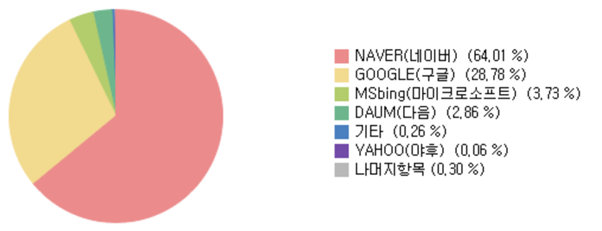
2026 search engine share in Korea
Naver holds approximately 64% of Korea’s search market. Google sits at around 29%, and Bing accounts for roughly 4%, with the remainder split among smaller platforms.
What separates Naver from Google is not just the language — it is the entire model. Naver operates more like a content portal than a traditional search engine. A single results page can surface blog posts, user-generated content, shopping listings, news articles, Q&A threads, maps, and organic website results simultaneously.
The practical implication for marketers is that Naver SEO is not just about your website. Performance on Naver depends on presence across its ecosystem — Blog, Café, KnowledgeIn, Shopping, and Place.
Is Naver available in English?
There is no official English version of Naver. A browser translation tool such as Chrome’s built-in translator provides a reasonable workaround for navigating the interface, though certain elements — particularly shopping ads — may not translate cleanly.
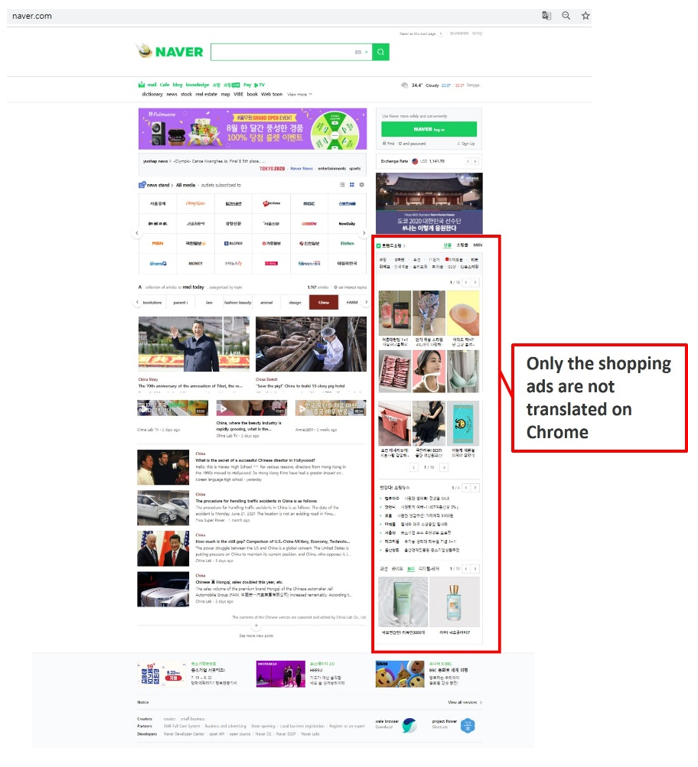
Naver’s homepage when Chrome’s auto-translate is applied
2. What appears on a Naver search results page?(SERP OVERVIEW)
Naver’s search results page is considerably more complex than Google’s. Where Google typically returns around 10 organic results per page, Naver can display 19 or more distinct content sections on a single SERP, including:
- Paid search ads (positioned at the top for commercial queries)
- AI Briefing (AI-generated answer summary)
- Organic website results
- Blog results (smart block format, drawing from Naver Blog and Café)
- News
- Shopping (Naver Smart Store)
- Images and video
- KnowledgeIn (Q&A results)
- Maps and local listings (Naver Place)
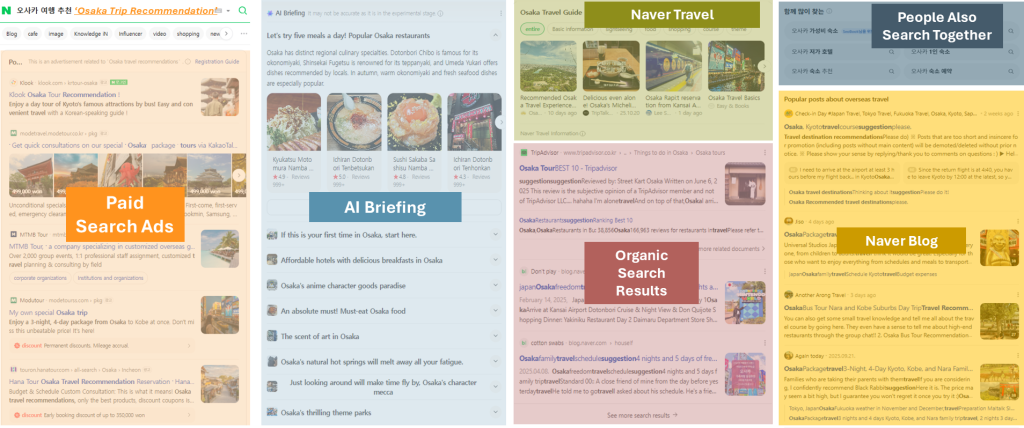
Naver SERP example
The composition and ranking of search sections vary depending on the query intent and user behavior signals. Queries with strong commercial intent tend to prioritize the Naver Shopping section, while informational queries more commonly display AI Briefing and blog content in prominent positions.
A few structural notes worth knowing:
- The standalone Website section was phased out in 2020, with external web results increasingly integrated into Naver’s universal search experience.
- Since February 2024, Naver has reorganized the VIEW area into smart-block-based results that surface Blog and Café content according to search intent and topic relevance.
- Paid placements can occupy substantial visibility on commercial queries, particularly on mobile devices.
- Because Naver’s SERP includes multiple proprietary content ecosystems, effective visibility strategies typically require diversification beyond standalone website SEO.
3. THE CHANGE IN 2026: AI TAKES OVER SEARCH
Naver has been integrating AI into its search experience for several years. 2026 is the point at which that integration has reached a scale that changes how the platform works in practice. Two developments define this shift: AI Briefing reaching meaningful coverage across Naver’s search results, and the launch of the AI Tab as a dedicated conversational search product.
Search behavior in Korea is evolving rapidly. The search features users engage with, the content surfaced in results, and the structure of visibility within Naver’s SERP are all continuing to change.
AI Briefing
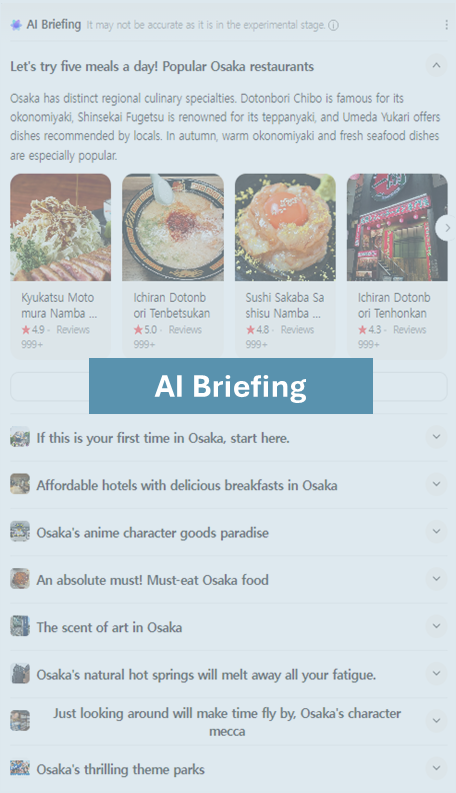
Example of AI briefing
AI Briefing is an AI-generated summary feature that appears directly within Naver’s search results for selected queries. It synthesizes information from Blogs, Café posts, KnowledgeiN content, and other indexed sources to present a summarized response near the top of the SERP, typically alongside or above related source links.
As of April 2026:
- AI Briefing is applied to 20% of all Naver search queries
- It has over 30 million monthly active users
The format is also evolving. Naver is introducing video summary briefings — for example, for queries like “Galaxy S26 Privacy Mode” — and action-oriented results that connect directly to purchases or reservations for specific product searches. For local businesses, Place-specific AI Briefing has driven a 105% increase in reservations for small business listings on Naver Place, with businesses that previously had no online bookings now averaging 10 new reservations.
4. RELATED SEARCH IS GONE — HERE’S WHAT REPLACED IT
On April 30, 2026, Naver discontinued its Related Search feature. The shutdown was announced on April 6, 2026, via Naver’s official Search & Tech blog.
Related Search was the set of suggested keywords that appeared at the top of Naver’s integrated search results page. Naver cited its broader push toward AI-driven search as the reason for the change — specifically, the development of features better suited to understanding user intent and context, rather than surfacing adjacent keywords.
The two features Naver identified as replacements are:
- AI Briefing — delivers a synthesized answer to the user’s query directly within the search results page.
- Related Questions— follow-up questions that appear beneath the Briefing result, helping users explore a topic further.
For marketers who have used Related Search as part of their Naver keyword research process, this is worth factoring into your workflow going forward. Naver’s direction is clearly toward intent- and context-based discovery — whether that requires a significant change to your research process will depend on how heavily your current approach relied on it.
5. INTRODUCING THE NAVER AI TAB
Naver launched the AI Tab on April 28, 2026. It is currently in beta with a full public rollout planned for all Naver users in the future.
The AI Tab is a conversational search interface built directly into Naver — not a separate product, but an extension of the existing search experience. It is best understood as the next step beyond AI Briefing. Where Briefing provides a summary within the standard SERP, the AI Tab is a dedicated space for extended, multi-turn search conversations.
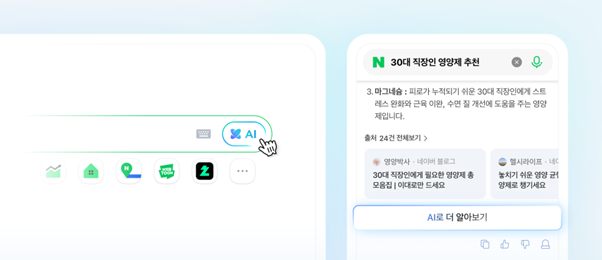
Naver AI Tab
How it works
Users can enter intent, context, and preferences freely into the AI Tab’s search bar. It handles complex, long-form queries and maintains conversational context across follow-up questions to provide relevant answers.
According to Naver, the current scope covers daily life information, current trends, home recipes, restaurant recommendations, career-related content, travel planning, and more.
The AI Tab also draws from Naver’s UGC ecosystem — specifically Naver Café and Blog — to surface experiential details such as food taste, restaurant atmosphere, product reviews, and travel tips. Rather than simple summaries, it aims to pull together the kind of first-hand, on-the-ground information that tends to live in user-generated content.
Examples from Naver’s launch announcement
- Looking for headphones for long sessions → AI Tab suggests options with soft ear cups and low clamping force, drawn from Naver Plus Store data
- Looking for a café good for conversation → AI Tab finds options that are not too loud and have reasonable seating distance, drawn from Naver Place reviews
- Looking for a study café → AI Tab factors in outlet availability and space size
How to access it
From within a standard search, click “Learn more with AI” at the bottom of an AI Briefing result. Alternatively, on the Naver PC homepage, click the “AI” button in the main search bar. Mobile access is being added in the near term.
6. HOW KOREAN SEARCH BEHAVIOR HAS SHIFTED
Naver’s AI features have not only changed what appears on the results page. They have changed how people search. Naver published supporting data in April 2026 that makes this concrete.
From keywords to full questions
Since AI Briefing launched, long-tail queries — searches phrased as complete sentences, questions, or requests — have more than doubled on Naver.
This is a direct result of what Naver calls its “On-Service AI” strategy: rather than directing users to a separate AI tool, Naver brought AI capabilities into the existing search bar. Users have responded by searching the way they would ask a question, not the way they would type a keyword.
For example, someone searching for skincare product recommendations is no longer just typing a product category. They are more likely to enter a full description of their skin type and what they are looking for — and then continue from there.
Search sessions are getting longer
Users are also less likely to stop after a single query. The Related Questions feature surfaces follow-up topics beneath AI Briefing results, and the data reflects this:
- Clicks on Related Questions have increased 6x
- Re-search keyword click rates have risen 86.1%
A single search query is now regularly the beginning of an extended session rather than a standalone transaction.
7. How does Naver rank content?
Naver uses several algorithms to evaluate and rank content. The two most relevant for content creators and marketers are C-Rank and D.I.A+, both of which have been in place since the mid-2010s and continue to apply to Naver’s search results today.
C-Rank
C-Rank measures the authority and quality of a content source, particularly blogs. A blog that focuses consistently on a specific topic is more likely to rank higher in that area than one without a clear theme. This is not just an algorithmic outcome — Naver itself recommends manually selecting blog categories for each post to help C-Rank accurately identify what a blog covers, rather than leaving it entirely to the algorithm to determine.
D.I.A+
D.I.A+ evaluates how well a piece of content matches the user’s search intent. It also crawls a blog post’s feature image and uses it to generate a visual snippet in the SERP, which affects how prominently a post appears in search results.
The SOLID Project
In 2021, Naver introduced an algorithm update called the SOLID project. It improved how Naver interprets title tags and meta descriptions, enabling the platform to better match search intent to content. This update applies to Naver’s universal search section and remains in place.
8. What technical SEO settings does Naver require?
Naver Search Advisor
Naver Search Advisor (formerly Naver Webmaster Tools) is the platform’s equivalent of Google Search Console, though its functionality is more limited in scope. The key functions relevant to SEO are:
Robots.txt: Create and manage crawl directives for Yeti, Naver’s search bot. The robots.txt file must be placed in the root directory of your site. Naver’s Search Advisor provides a built-in tool to generate, validate, and submit robots.txt updates directly.
XML Sitemaps: Submit an XML sitemap via the Request menu in Search Advisor to help Yeti crawl your site efficiently. Supported optional tags include changefreq, priority, and lastmod. Note that Naver also supports RSS feed submission alongside sitemaps — both can be submitted through Search Advisor.
Indexation monitoring: Review crawlability and indexation data from within Search Advisor. The Naver site: search operator provides an additional way to check which pages are indexed — search site:yourdomain.com directly in Naver.
Note that it can take up to one week after Yeti visits for content to appear in search results.
Backlink data: Monitor your inbound link profile from within Search Advisor.
Social channel connections: Link social profiles to your website using schema markup. Naver’s crawler recognizes connections to Naver Blog, Naver Café, Naver Post, Brandstore, Naver TV, Facebook, Instagram, iTunes, Google Play Store, LinkedIn, Kakao Story, and others.
Open Graph Tags: Open Graph tags control how your content appears when shared on social platforms. Korea has one of the highest social media penetration rates in the world, making proper OG tag implementation worth including in any technical SEO audit.
9. Is Naver Blog still important for SEO?
Naver Blog has always been central to organic search performance on Naver. In 2026, its role has expanded — according to Naver, the AI Tab draws from Naver Café and Blog content to generate experiential answers, and AI Briefing similarly pulls from Naver’s UGC ecosystem.
Building authority with C-Rank
C-Rank rewards topical consistency. A blog that stays within one subject area builds authority over time within that area. Naver recommends selecting topic categories manually for each post, rather than relying on the algorithm to infer the topic — manual selection improves C-Rank accuracy.
There are 32 available categories across four groups:
- Entertainment & Culture: Literature, Film, Art & Design, Exhibitions, Music, TV, Celebrities, Animation, Online Shows
- Lifestyle & Shopping: Daily Life, Parenting & Family, Pets, Photography, Fashion & Beauty, Home & DIY, Food & Recipes, Product Reviews, Plants
- Hobbies & Travel: Gaming, Sports, Photography, Cars, Hobbies, Domestic Travel, International Travel, Restaurants
- Knowledge & Trends: IT & Computing, Society & Politics, Health & Wellness, Business & Economics, Languages, Education
Image guidelines
Use descriptive file names for all images. Add captions directly in the blog editor. The feature image is particularly important — it appears as a visual thumbnail in SERP results for top-ranking posts.
Writing for AI retrieval
Naver has stated that the AI Tab surfaces experiential details from Naver Café and Blog content — specifically food taste, restaurant atmosphere, product reviews, and travel tips. Based on this, content that is specific, first-hand, and experience-based is more aligned with what the AI Tab is designed to surface.